Get started
From nothing to an integration that listens, with the responses of a real run.
This walkthrough goes from nothing to an integration that listens for signed events. It passes through a credential, a read, a failure, a subscription and a verified signature. All of it exists in any workspace, whatever the trade; what belongs to one vertical is in its own group, at the end of this page.
The responses on this page come from a run against a test workspace with three locations. Your identifiers will be different; the shape is the same.
The examples keep the Spanish run's values
The run behind this page went against a Spanish-speaking workspace. Key names,
the location called Sucursal Providencia and the API's Spanish messages
appear exactly as the API returned them.
1. Get an API key
Every call to this API travels with an sk_ key, and that key decides which workspace you read from.
There are two ways to get your first one, and which applies depends on who you are.
If the workspace is yours, the key is minted from the application, under Configuración › Desarrolladores › API keys. The app's own interface is Spanish, so its screens are named here the way you'll see them. The secret shows once, when you create it:
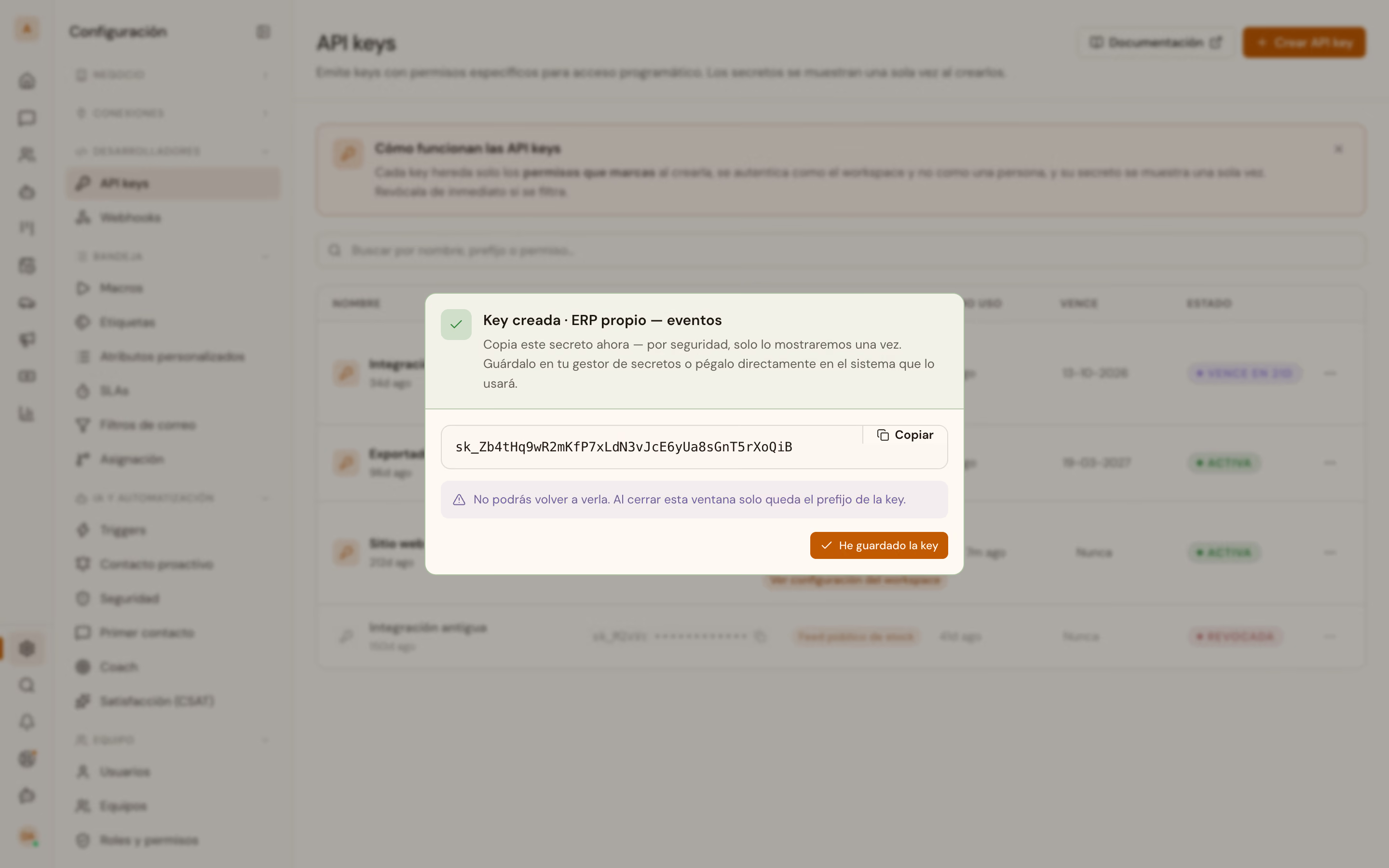
Copy it then. Once the dialog closes, the list keeps the name, the prefix, the permissions and when the key was last used. It does not keep the secret:
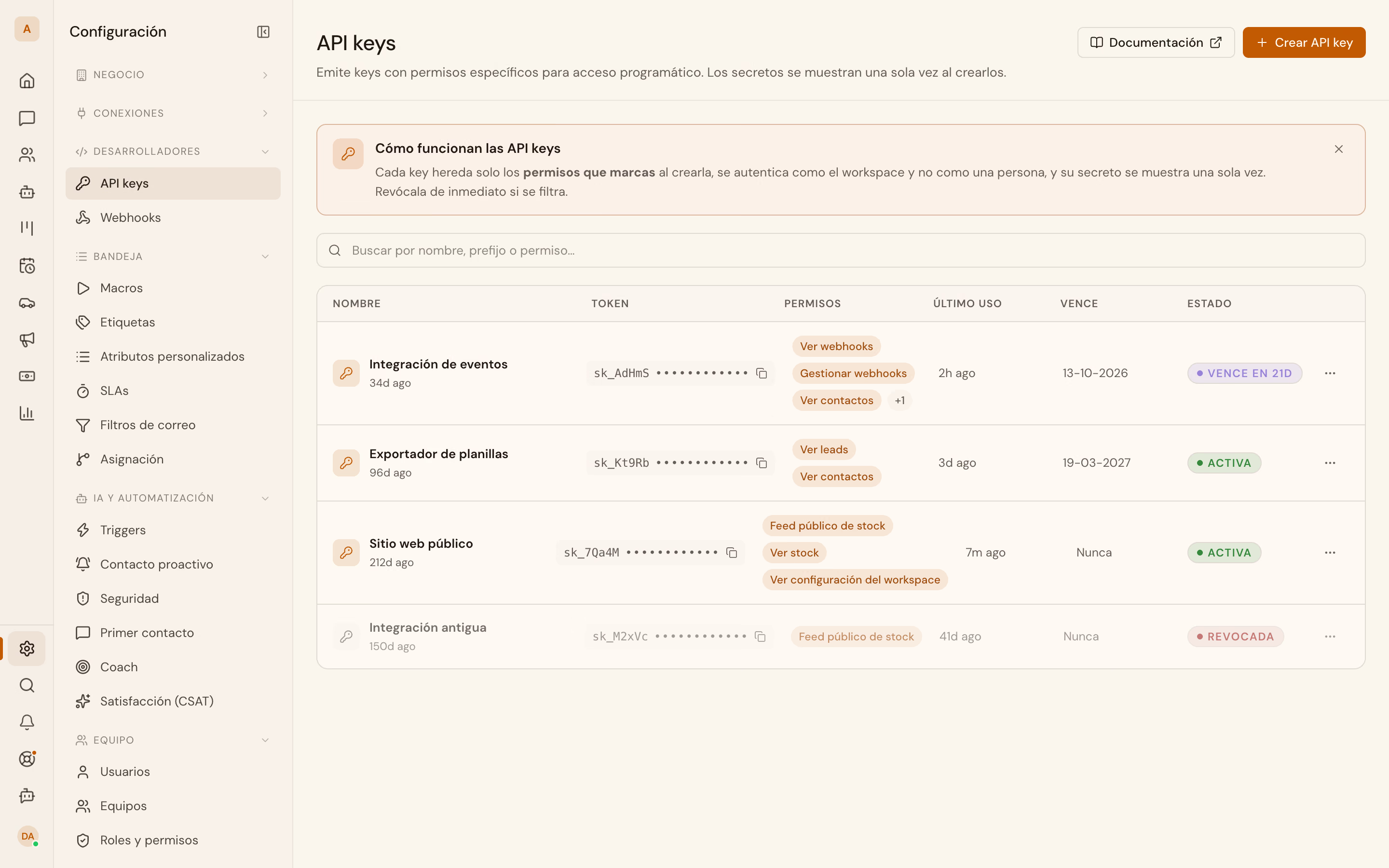
That same section groups Webhooks, in that order and for administrators only. MCP servers connect separately, under Conexiones › Servidores MCP.
If you already hold a key with the api_keys:write permission, you mint the next ones yourself. It's one call, and it's the one everything below hangs off:
curl -X POST https://api.vitrinadev.com/api/v1/api-keys \
  -H "Authorization: Bearer $VITRINA_ROOT_KEY" \
  -H "Content-Type: application/json" \
  -d '{ "name": "docs — lectura del workspace", "scopes": ["tenant:read"] }'
{
"data": {
"id": "2e613613-1142-4fea-a979-a9d3f274b07f",
"tenant_id": "00000000-0000-4000-8000-000000000001",
"name": "docs — lectura del workspace",
"prefix": "sk_LV8lX",
"scopes": ["tenant:read"],
"created_at": "2026-09-22T03:16:03.368968+00:00",
"last_used_at": null,
"expires_at": null,
"revoked_at": null,
"secret": "sk_LV8lX…"
}
}data.secret is the key, and this is the only moment you'll ever see it whole. Later reads return prefix, its first few characters, and nothing else. It's truncated above; yours arrives complete.
export VITRINA_KEY="<the full data.secret from the response>"scopes is what that key is allowed to do, and it pays to ask for the least. tenant:read opens the workspace and its locations for reading, and nothing more. The whole catalogue, with what each permission opens and which roles carry it, is in Scopes.
Trap
Asking for a permission your key lacks answers 403
From a credential that only carries api_keys:read and api_keys:write,
asking for tenant:read on the new key ends like this:
{
  "error": {
    "code": "FORBIDDEN",
    "message": "You cannot grant an API key that includes a permission you do not have (tenant:read)",
    "requestId": "cf505046-9b85-424c-b0cf-e76a1ec8ac5c"
  }
}
Whoever mints has to already hold the permission being handed out, so that a narrow credential can't promote itself.
2. Read something from the workspace
Locations are the best first GET. They exist in every workspace, they work in any trade, and they carry nobody's personal data.
curl https://api.vitrinadev.com/api/v1/locations \
  -H "Authorization: Bearer $VITRINA_KEY"
{
"data": [
{
"id": "6812d9f0-9bed-44b5-91df-4e5b90941f6b",
"tenant_id": "00000000-0000-4000-8000-000000000001",
"name": "Sucursal Providencia",
"address_street": "Av. Nueva Providencia",
"address_number": "2214",
"comuna_code": "13123",
"region_code": "13",
"phone": "+56229876543",
"email": "[email protected]",
"manager_name": "Paula Riquelme",
"hours": { "lun_vie": "09:00-19:00", "sab": "10:00-14:00" },
"timezone": "America/Santiago",
"is_active": true,
"display_seq": 1,
"display_id": "B-1",
"created_at": "2026-09-15T18:34:09.375Z",
"updated_at": "2026-09-15T18:34:26.470Z"
}
]
}The example is trimmed to one location and to the fields that explain themselves. The real response carries all three and a few more fields besides, all of them in Locations.
Two fields are worth knowing right away. display_id, here B-1, is the identifier a person sees in the application, and the routes that take an :id accept either that or the UUID. comuna_code is the comuna's official code, because the address is stored in parts rather than as one line of text.
3. Recognise a failure
If you ask for a location that doesn't exist:
curl https://api.vitrinadev.com/api/v1/locations/00000000-0000-4000-8000-0000000000ff \
  -H "Authorization: Bearer $VITRINA_KEY"
{
"error": {
"code": "NOT_FOUND",
"message": "Sucursal no encontrada",
"requestId": "bf44aad4-6554-45ea-95f5-bc215f11d373"
}
}404, and the body carries error instead of data. A successful response carries data; a failed one carries error.
The other two failures you'll meet on day one are the missing credential and the missing permission. They aren't the same thing:
{
  "error": {
    "code": "UNAUTHORIZED",
    "message": "Missing bearer token",
    "requestId": "eb0c880e-20d1-4144-818c-d92d0a93ef05"
  }
}
{
"error": {
"code": "FORBIDDEN",
"message": "Missing required scope: webhooks:write",
"requestId": "f7614421-ef08-4638-8524-2af320d1ab3c"
}
}The 401 says "I don't know who you are"; the 403, "I know who you are and it isn't enough". You get to the second with the key from step 1, which never asked for webhooks:write. The next step fixes that.
Branch on error.code and never on error.message. The code doesn't get reworded; the message is written for a person. Keep the requestId too: it's what lets us find your call in the logs when something doesn't add up.
The full catalogue, with what to do about each code, is in Errors.
4. Subscribe to the events
Up to here you asked; from here you get told. A webhook subscription is a URL of yours and a list of events. Every time one happens, a signed POST goes out to that URL.
The same subscription is managed from the application, under Configuración › Desarrolladores › Webhooks, with its delivery log beside it:
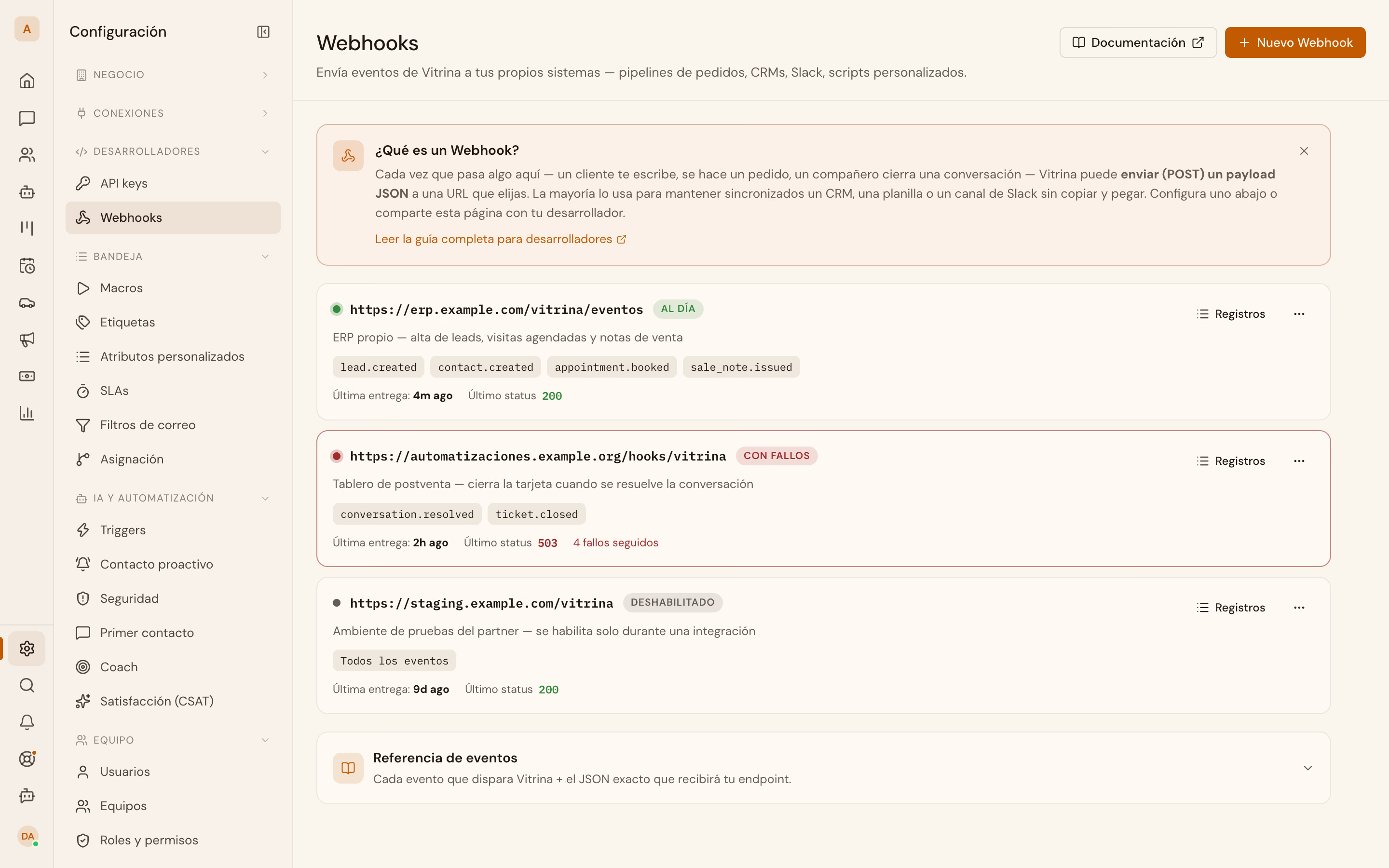
This part needs a second key: subscribe, read the delivery log, and read the two resources you're about to listen to. Those last two permissions are there because of the webhooks. This key will be the subscription's owner, and an event carries the resource's data only if its owner may read it. Without contacts:read, contact.created arrives with no data and with "data_omitted": "missing_scope:contacts:read".
curl -X POST https://api.vitrinadev.com/api/v1/api-keys \
  -H "Authorization: Bearer $VITRINA_ROOT_KEY" \
  -H "Content-Type: application/json" \
  -d '{
    "name": "docs — integración de eventos",
    "scopes": ["webhooks:read", "webhooks:write", "contacts:read", "appointments:read"]
  }'
{
"data": {
"id": "44d47e2e-51ad-4787-92e3-e060d4df4dcc",
"name": "docs — integración de eventos",
"prefix": "sk_AdHmS",
"scopes": ["webhooks:read", "webhooks:write", "contacts:read", "appointments:read"],
"created_at": "2026-09-22T03:16:13.725936+00:00",
"secret": "sk_AdHmS…"
}
}export VITRINA_KEY="<the full data.secret from the response>"Now the subscription:
curl -X POST https://api.vitrinadev.com/api/v1/webhooks \
  -H "Authorization: Bearer $VITRINA_KEY" \
  -H "Content-Type: application/json" \
  -d '{
    "url": "https://tu-dominio.cl/vitrina",
    "events": ["contact.created", "appointment.booked"],
    "description": "recorrido de Empezar",
    "include_data": true
  }'
{
"data": {
"id": "3c320af5-54a9-4959-9d7f-875d2a046db9",
"tenant_id": "00000000-0000-4000-8000-000000000001",
"url": "https://tu-dominio.cl/vitrina",
"secret": "whsec_ae3…",
"events": ["contact.created", "appointment.booked"],
"enabled": true,
"description": "recorrido de Empezar",
"created_at": "2026-09-22T03:19:34.808819+00:00",
"updated_at": "2026-09-22T03:19:34.808819+00:00",
"last_delivery_at": null,
"last_status": null,
"consecutive_failures": 0,
"owner_kind": "api_key",
"owner_id": "44d47e2e-51ad-4787-92e3-e060d4df4dcc",
"include_data": true,
"paused_at": null,
"paused_reason": null,
"failing_since": null,
"consecutive_failed_deliveries": 0
}
}Three fields in that response.
include_data: true is «Incluir datos del recurso»: it asks for every delivery to carry the whole resource in data. Without it, the same delivery arrives as the notice, with "data_omitted": "not_requested", saying which resource, who, when, and a url to read it. The two modes are explained in Webhooks. owner_kind and owner_id say who the owner is: the key you created it with.
secret comes back whole once, here. It's truncated above; yours arrives as whsec_ plus 64 hexadecimal characters. Every later read gives you nine characters and an ellipsis. Save it before you close the terminal: without it you can't verify anything, and it can't be recovered.
url has to be public. Registering http://localhost:4000/... answers VALIDATION_ERROR with Blocked private/loopback address, and the Webhooks chapter explains why.
5. Verify the signature
Every delivery carries four headers:
X-Webhook-Event: contact.created
X-Webhook-Event-Id: 4026912d-c811-45cf-87c1-4147e5843a01
X-Webhook-Timestamp: 1790047183
X-Webhook-Signature: t=1790047183,v1=<hex>
The v1 is an HMAC-SHA256 keyed with your subscription's secret, over the string ${timestamp}.${body}: the timestamp, a dot, and the raw body, byte for byte as it arrived.
This is a worked example, with the three inputs and the result. The body is from a real delivery. The secret isn't: the real one is a live credential. It's replaced with an example secret, and the signature recomputed over that same body and that same timestamp.
Secret
whsec_2f6b1e93c0a74d58bd3e0f21a7c4859e6d0b3f47a91c25e8d764b0a3c518f92dTimestamp
1790047183Raw body, on one line, exactly as it travels:
{"id":"4026912d-c811-45cf-87c1-4147e5843a01","type":"contact.created","version":1,"created_at":"2026-09-22T03:19:40.395Z","tenant_id":"00000000-0000-4000-8000-000000000001","resource":{"type":"contact","id":"01a0c720-5327-7397-a40b-63944d902a3c","url":"https://api.vitrinadev.com/api/v1/contacts/01a0c720-5327-7397-a40b-63944d902a3c"},"author":{"kind":"api_key","id":"03509054-6048-4fd3-ae65-7f6e9f603a41","name":"Integración CRM"},"data":{"id":"01a0c720-5327-7397-a40b-63944d902a3c","name":"Camila Herrera","email":"[email protected]","phone":"+56961234568","lifecycle_stage":"unknown","origin_channel":"manual","company_id":null,"created_at":"2026-09-22T03:19:39.127+00:00"}}Expected signature
56778d7f417517d2f239f6233a8469d364b0f426a7d1ae195e5c718027fd5287And this is the verifier, with no dependencies, in the three languages a receiver usually gets written in:
# The signature is an HMAC over `${timestamp}.${body}`; openssl is enough to see it.
TS=1790047183
BODY=$(cat delivery.json)   # the raw body, not re-indented

printf '%s.%s' "$TS" "$BODY" \
  | openssl dgst -sha256 -hmac "$VITRINA_WEBHOOK_SECRET" -r \
  | cut -d' ' -f1
-r prints the hex on its own; compare it with the v1 in the header. For a
real receiver use one of the next two: this one neither compares in constant
time nor checks the time window.
Any of those verifiers, run over the values above, prints this. The labels are the Spanish run's:
X-Webhook-Timestamp: 1790047183
X-Webhook-Signature: t=1790047183,v1=56778d7f417517d2f239f6233a8469d364b0f426a7d1ae195e5c718027fd5287
v1 = 56778d7f417517d2f239f6233a8469d364b0f426a7d1ae195e5c718027fd5287
verificación (reloj del envío): {"ok":true,…}
verificación (una hora después): stale
un byte cambiado: bad_signature
The last three lines are the point. With the clock of the delivery, the signature holds. An hour later the same delivery is rejected as old, which stops anyone replaying a delivery they saw last month. And with a single byte of the body changed, the signature stops matching.
Trap
With req.body already parsed, every signature fails
JSON.parse followed by JSON.stringify hands you an equivalent object and a
different string, and the signature is over the string. If your framework
gives you req.body already parsed, the original bytes are gone and every
signature fails without your knowing why.
In Express, keep the buffer:
app.use(express.json({ verify: (req, _res, buf) => { req.rawBody = buf; } }));In Python it's the same thing under other names: request.get_data() in Flask
rather than request.json, await request.body() in FastAPI, request.body
in Django.
Compare in constant time, with crypto.timingSafeEqual or hmac.compare_digest rather than ===. And always check the timestamp: with no time window, an old signature still passes.
6. Receive the first event
With the subscription live, someone created a contact in the workspace. This is what reached the receiver, whole:
{
  "id": "4026912d-c811-45cf-87c1-4147e5843a01",
  "type": "contact.created",
  "version": 1,
  "created_at": "2026-09-22T03:19:40.395Z",
  "tenant_id": "00000000-0000-4000-8000-000000000001",
  "resource": {
    "type": "contact",
    "id": "01a0c720-5327-7397-a40b-63944d902a3c",
    "url": "https://api.vitrinadev.com/api/v1/contacts/01a0c720-5327-7397-a40b-63944d902a3c"
  },
  "author": {
    "kind": "api_key",
    "id": "03509054-6048-4fd3-ae65-7f6e9f603a41",
    "name": "Integración CRM"
  },
  "data": {
    "id": "01a0c720-5327-7397-a40b-63944d902a3c",
    "name": "Camila Herrera",
    "email": "[email protected]",
    "phone": "+56961234568",
    "lifecycle_stage": "unknown",
    "origin_channel": "manual",
    "company_id": null,
    "created_at": "2026-09-22T03:19:39.127+00:00"
  }
}
The envelope says what it's about before data. resource is the contact, with the url to read it. author is who created it, here an API key. Had a person created it from the application, it would say "kind": "member" with their name. version is the version of the data schema, and it goes up when that schema changes in an incompatible way.
phone arrives in E.164 when it could be normalised. lifecycle_stage starts at unknown; the team moves it along from the application, never the API.
Three things don't fire this event: a contact that arrives alongside a conversation (WhatsApp, Instagram, email…), a CSV import, and a merge of duplicates. The Event catalogue carries that list event by event.
7. Receive a second, from another resource
Then an appointment was booked for that same contact:
{
  "id": "ff9de834-d795-4d27-b9a0-b6c322ba6e77",
  "type": "appointment.booked",
  "version": 1,
  "created_at": "2026-09-22T03:20:59.358Z",
  "tenant_id": "00000000-0000-4000-8000-000000000001",
  "resource": {
    "type": "appointment",
    "id": "ac36555c-9d1f-4413-ad72-f2ea08afbf41",
    "url": "https://api.vitrinadev.com/api/v1/appointments/ac36555c-9d1f-4413-ad72-f2ea08afbf41"
  },
  "author": {
    "kind": "api_key",
    "id": "03509054-6048-4fd3-ae65-7f6e9f603a41",
    "name": "Integración CRM"
  },
  "data": {
    "id": "ac36555c-9d1f-4413-ad72-f2ea08afbf41",
    "display_id": "A-1",
    "status": "confirmed",
    "kind": "external",
    "starts_at": "2026-09-25T14:00:00.000Z",
    "ends_at": "2026-09-25T14:45:00.000Z",
    "vehicle_id": null,
    "owner_user_id": null,
    "lead_id": null,
    "contact_id": "01a0c720-5327-7397-a40b-63944d902a3c",
    "appointment_type_id": null
  }
}
The same envelope, a different resource: that's all that changes from one event to the next. contact_id ties it back to the previous event. kind says what sort of appointment it is, and each vertical uses its own; the Event catalogue lists them.
starts_at and ends_at are UTC, always. The time zone a person sees them in is their location's (timezone, back in step 2).
8. Check what we delivered
Every delivery attempt leaves a row, including the ones that failed:
curl https://api.vitrinadev.com/api/v1/webhooks/3c320af5-54a9-4959-9d7f-875d2a046db9/deliveries \
  -H "Authorization: Bearer $VITRINA_KEY"
{
"data": [
{
"id": 113,
"subscription_id": "3c320af5-54a9-4959-9d7f-875d2a046db9",
"event": "appointment.booked",
"event_id": "ff9de834-d795-4d27-b9a0-b6c322ba6e77",
"attempt": 1,
"status_code": 200,
"error": null,
"response_excerpt": "{\"received\":true}",
"latency_ms": 676,
"created_at": "2026-09-22T03:21:01.237791+00:00",
"redelivery_of": null
},
{
"id": 112,
"subscription_id": "3c320af5-54a9-4959-9d7f-875d2a046db9",
"event": "contact.created",
"event_id": "4026912d-c811-45cf-87c1-4147e5843a01",
"attempt": 1,
"status_code": 200,
"error": null,
"response_excerpt": "{\"received\":true}",
"latency_ms": 691,
"created_at": "2026-09-22T03:19:44.069495+00:00",
"redelivery_of": null
}
],
"meta": { "pagination": { "limit": 50 }, "offset": 0 }
}Every row also carries request_payload, the exact envelope we sent. It's left out here, since you've already seen it twice. redelivery_of is null except on a redelivery made by hand, which points at the row it repeats.
It's the first place to look when "the webhooks aren't arriving". With rows in the 500s under status_code, the problem is at your endpoint and we're retrying it. With no rows at all, the event never fired or your subscription doesn't include it.
From here, Authentication and API keys covers rotation, revocation and the per-minute call ceiling. Webhooks covers retries and the auto-pause, and the event catalogue carries the fields of each one. To read the workspace from Claude or Cursor, read-only, there's MCP.
And from here on, what belongs to your own trade:
Recipes for car dealerships
Load your stock without loading the same car twice · Publish your stock on your website · List who's interested in a car · Receive leads in your CRM with webhooks · Send your customer a notice when the car they wanted arrives · Export the vehicle's file to your system
Recipes for clinics
Open the clinic's calendar to your software · Receive appointments in your system · Connect Claude to your calendar