Assign each message to the right team, with a clock on it
Teams, assignment rules and an SLA as one working configuration
A new conversation needs to land in someone's hands, fast. This recipe builds teams, assignment rules and an SLA as one configuration, not as separate pieces. By the end, a new message knows who owns it. And someone finds out if nobody answered in time.
Trap
Two rules can match the same conversation: the first one in the list wins, never the more specific one
Rules are evaluated in order and the first one that matches on source and channel wins. A rule with no members falls through to the next matching rule and, if none matches, to the channel. A rule with members but nobody online does not keep looking: the conversation stays unassigned.
Before you start
teams:writeto create teams and add members.routing:writefor assignment rules. It is an admin-only scope, absent from an agent's default set.slas:writeandtriggers:writefor the clock and whatever fires when it runs out.- Roles and permissions inside a team live in Teams and roles; this recipe covers only routing.
1. Build the team
curl -X POST https://api.vitrinadev.com/api/v1/teams \
  -H "Authorization: Bearer $VITRINA_KEY" \
  -H "Content-Type: application/json" \
  -d '{ "name": "Atención Norte" }'
{
"data": {
"id": "42f4b285-802b-4d94-ac9e-ab3d5f7d615c",
"name": "Atención Norte",
"hours_mode": "workspace",
"hours": null
}
}curl -X POST https://api.vitrinadev.com/api/v1/teams/42f4b285-802b-4d94-ac9e-ab3d5f7d615c/members \
-H "Authorization: Bearer $VITRINA_KEY" \
-H "Content-Type: application/json" \
-d '{ "user_id": "3197957f-5fb6-4c7a-837d-1fe296bc548d", "role": "member" }'{ "data": { "team_id": "42f4b285-802b-4d94-ac9e-ab3d5f7d615c", "user_id": "3197957f-5fb6-4c7a-837d-1fe296bc548d", "role": "member" } }hours_mode starts at workspace: the team inherits the general schedule. For its own hours, send hours_mode: "override" together with hours in the same call. Without the mode, the window saves as null, and creation still answers 201 without a word about nothing being saved.
2. Decide which conversation goes to which team
curl -X POST https://api.vitrinadev.com/api/v1/assignment-rules \
  -H "Authorization: Bearer $VITRINA_KEY" \
  -H "Content-Type: application/json" \
  -d '{ "name": "Website to Atención Norte", "match_sources": ["website"], "team_id": "42f4b285-802b-4d94-ac9e-ab3d5f7d615c" }'
{ "data": { "id": "01a0ce19-5294-7415-9d9f-70bd68420b80", "name": "Website to Atención Norte", "priority": 0, "match_sources": ["website"], "team_id": "42f4b285-802b-4d94-ac9e-ab3d5f7d615c" } }A rule carries exactly one destination: team_id or assignee_user_ids, never both. Empty match_sources and match_channels are a wildcard: they cover any origin or channel. A new rule always appends at the end; sending your own priority on create is a 400. The order gets changed afterward, in step 3.
3. Order the rules: whichever matches first, wins
curl -X PUT https://api.vitrinadev.com/api/v1/assignment-rules/order \
  -H "Authorization: Bearer $VITRINA_KEY" \
  -H "Content-Type: application/json" \
  -d '{ "ids": ["01a0ce19-6ad5-7eba-8d7e-e90a93f5ad8e", "01a0ce19-5294-7415-9d9f-70bd68420b80"] }'
{
"data": [
{ "id": "01a0ce19-6ad5-7eba-8d7e-e90a93f5ad8e", "name": "WhatsApp por defecto", "priority": 0 },
{ "id": "01a0ce19-5294-7415-9d9f-70bd68420b80", "name": "Website to Atención Norte", "priority": 1 }
]
}The change is atomic: it rewrites the priority of EVERY rule in the workspace at once, from the order of ids. The list has to carry every rule exactly once; a partial list is a 400 with nothing applied, never a half-done change.
If no rule matches, routing falls back to the channel: messaging_account.assignment_mode, configured from the app. If the channel does not have one either, it falls back to the workspace default. Rules carrying is_portal_default, the «Marketplace default» cards, always evaluate last, after any rule of your own.
4. Put a clock on it: define the SLA
curl -X POST https://api.vitrinadev.com/api/v1/slas \
  -H "Authorization: Bearer $VITRINA_KEY" \
  -H "Content-Type: application/json" \
  -d '{
    "name": "Atención estándar",
    "target_first_response_minutes": 30,
    "target_resolution_minutes": 1440,
    "business_hours_only": true,
    "applies_to": { "channel": "whatsapp" }
  }'
{
"data": {
"id": "2dcb37cf-fe55-4f9c-9e2b-c8eedaa4b695",
"name": "Atención estándar",
"target_first_response_minutes": 30,
"target_resolution_minutes": 1440,
"business_hours_only": true,
"applies_to": { "channel": "whatsapp" },
"active": true
}
}The two targets are independent: a policy can set only a first-response target, only a resolution target, or both. business_hours_only pauses the clock outside the team's hours, the same hours/hours_mode from step 1, instead of counting wall-clock time.
applies_to decides which conversations the policy applies to. It is a free filter, with the same keys your routing already uses: channel, brand, priority.
5. React when the clock runs out
curl -X POST https://api.vitrinadev.com/api/v1/triggers \
  -H "Authorization: Bearer $VITRINA_KEY" \
  -H "Content-Type: application/json" \
  -d '{
    "name": "Alert on SLA breach",
    "event": "sla_breached",
    "actions": [{ "type": "assign_team", "value": "42f4b285-802b-4d94-ac9e-ab3d5f7d615c" }]
  }'
{
"data": {
"id": "d6b003a7-6641-4415-843a-028940e0681b",
"name": "Alert on SLA breach",
"event": "sla_breached",
"actions": [{ "type": "assign_team", "value": "42f4b285-802b-4d94-ac9e-ab3d5f7d615c" }],
"enabled": true,
"run_count": 0
}
}sla_breached is one of twelve events a trigger can listen for. The rest cover the rest of a conversation's cycle: created, reopened, tagged, idle for hours. Conditions are optional: with no conditions, the action runs on every breach. With them, it filters by field, operator and value, combined with all or any. run_count climbs on every fire, so it is how you confirm the trigger actually ran.
To confirm it without opening the app, subscribe to the sla.breached and conversation.assigned events; the full catalog of events and signatures lives in Webhooks.
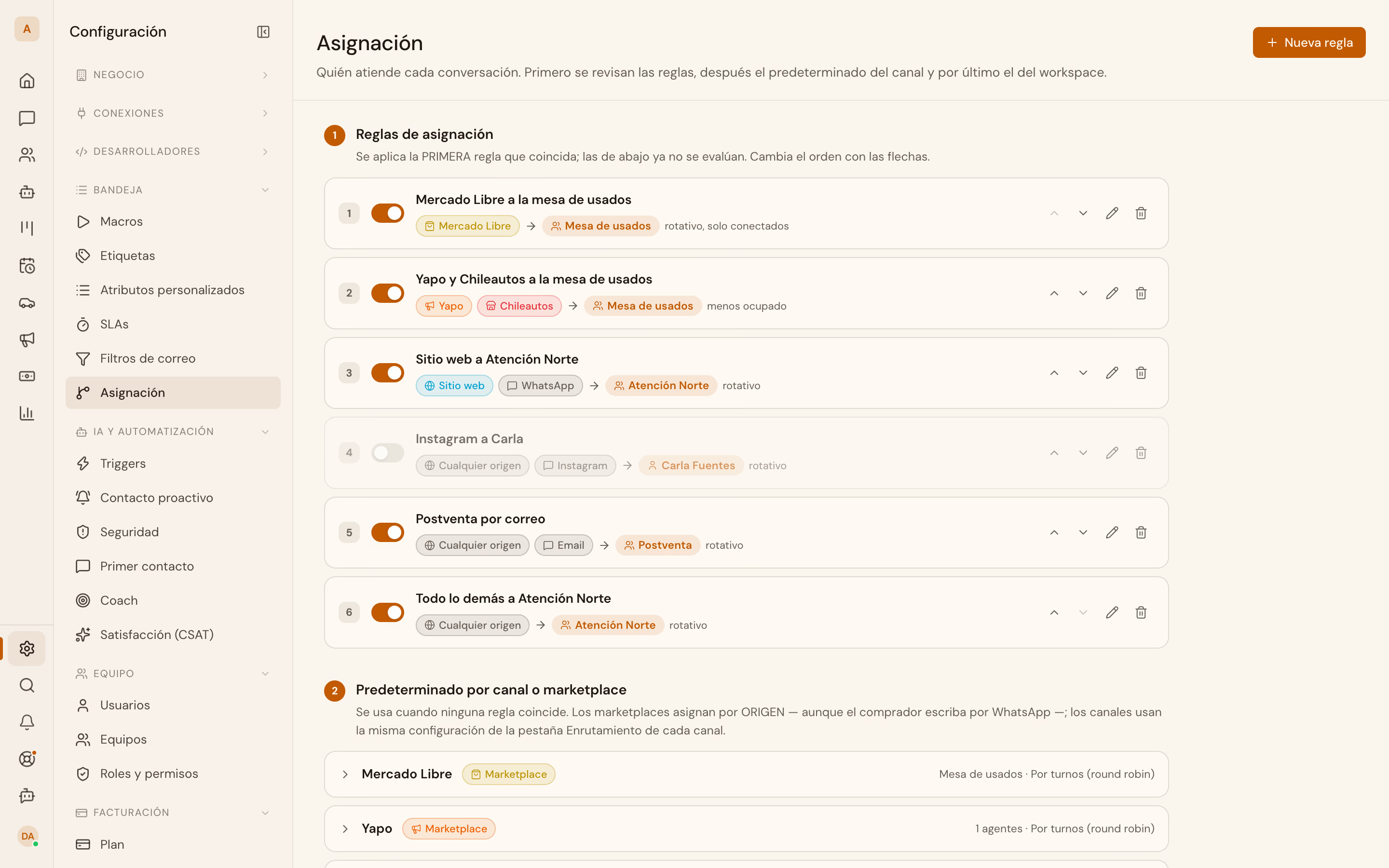
In the app: the rules live under Configuración → Bandeja → Asignación, numbered in the same priority order PUT /assignment-rules/order exposes.
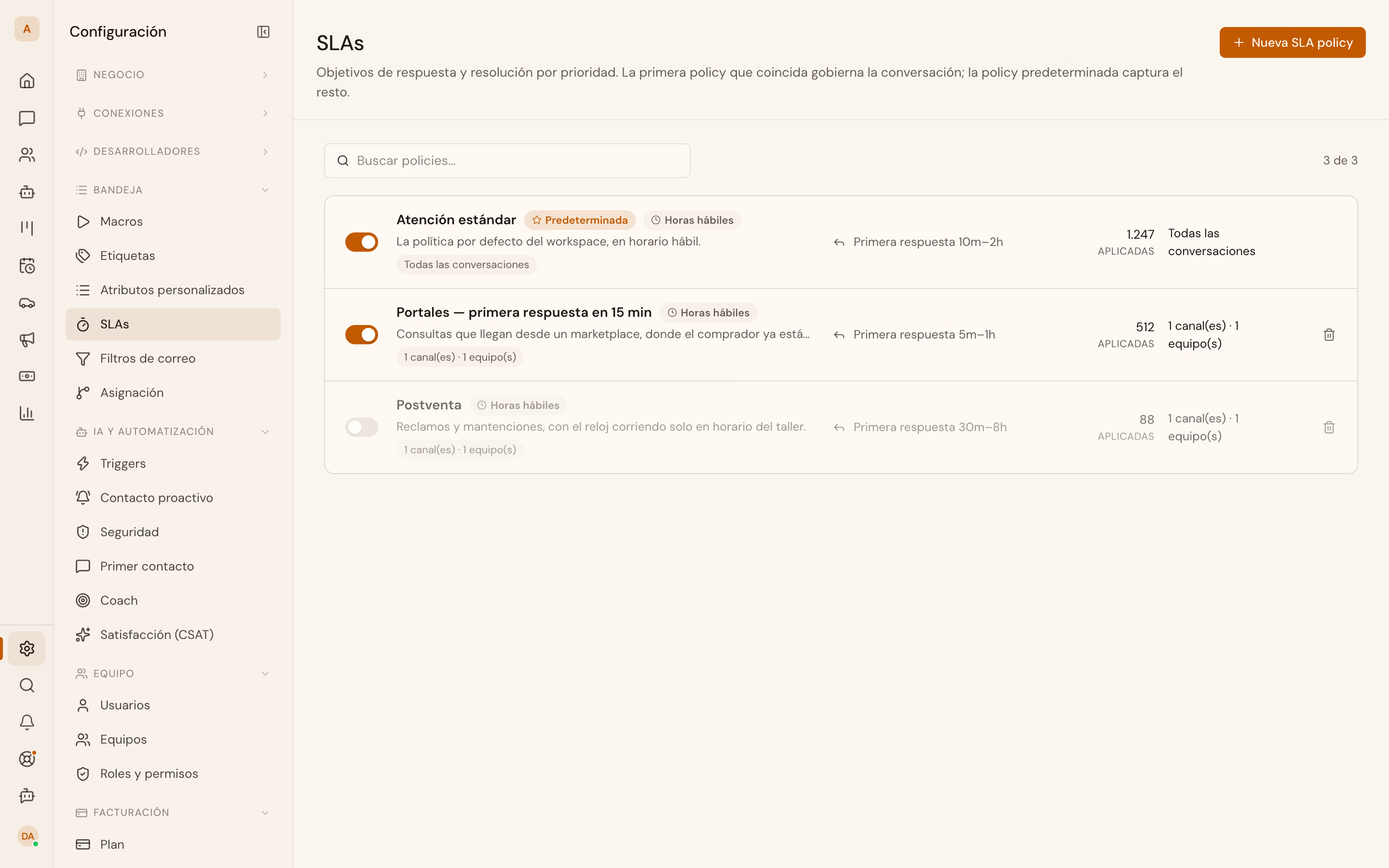
The clock is a different screen. SLAs are defined under Configuración → Bandeja → SLAs, and triggers under Configuración → IA y automatización → Triggers:
When it fails
Reordering with an incomplete list answers 400 and moves nothing:
{
  "error": {
    "code": "VALIDATION_ERROR",
    "message": "ids must list every rule of the workspace exactly once (expected 2, got 1)."
  }
}
The message carries the expected count against what it received. Before retrying, fetch GET /assignment-rules again and build the full list from there, instead of reordering only the rules that changed.
What this recipe leaves out
Macros are canned replies, with automated steps built in. They get created over the API the same way a rule does. Applying one, though, is still an inbox action: there is no matching call. Creation and its fields live in Macros and assignment rules. The detail of every trigger event and condition lives in SLAs and automations.