Load your stock without loading the same car twice
The duplicate rule by plate and VIN, and what happens on every collision.
Car dealershipsOnly in car-dealership workspaces.
A dealership loads inventory from more than one place: by hand, from its own ERP, from a portal that syncs on its own. Sooner or later the same car arrives twice. This recipe covers the full load (create, photos, review, publish) and, above all, what the API does when two loads describe the same car.
Trap
The plate blocks you right away. The VIN doesn't
POST /vehicles rejects a plate already held by another active vehicle, with
a 409 on the spot. A repeated VIN under a different plate does not get
rejected: the second car is created anyway, and the duplicate waits for the
dedup engine to catch it. If you integrate an ERP that reimports by VIN, run
POST /vehicles/dedup-backfill/report on a schedule; don't assume creation
warns you.
Before you start
- A key with
marketplace:writeto create and publish, andmarketplace:readto read. stock_dedup:readandstock_dedup:writeto review and apply merges.- The
location_idof the branch, from Locations.
1. Create the vehicle
curl -X POST https://api.vitrinadev.com/api/v1/vehicles \
  -H "Authorization: Bearer $VITRINA_KEY" \
  -H "Content-Type: application/json" \
  -d '{
    "make": "Toyota",
    "model": "Yaris",
    "version": "XLS 1.5",
    "year": 2022,
    "price_amount": 11990000,
    "price_currency": "CLP",
    "odometer_value": 28500,
    "odometer_unit": "KM",
    "type": "Car",
    "listing_type": "Usado",
    "registration_number": "LBXR21",
    "location_id": "6812d9f0-9bed-44b5-91df-4e5b90941f6b",
    "photos": [
      { "url": "https://cdn.vitrinadev.com/demo/yaris-1.jpg", "order": 0 },
      { "url": "https://cdn.vitrinadev.com/demo/yaris-2.jpg", "order": 1 }
    ]
  }'
{
"data": {
"id": "26a00eb8-62ce-4a02-a9a7-72204ed8a392",
"tenant_id": "00000000-0000-4000-8000-000000000001",
"make": "Toyota",
"model": "Yaris",
"version": "XLS 1.5",
"year": 2022,
"price_amount": 11990000,
"price_clp": 11990000,
"floor_price_clp": null,
"price_currency": "CLP",
"odometer_value": 28500,
"odometer_unit": "KM",
"registration_number": "LBXR21",
"vin": null,
"plate_normalized": "LBXR21",
"listing_type": "Usado",
"type": "Car",
"vehicle_type": "auto",
"status": "disponible",
"reserved_at": null,
"sold_at": null,
"location_id": "6812d9f0-9bed-44b5-91df-4e5b90941f6b",
"photos": [
{ "url": "https://cdn.vitrinadev.com/demo/yaris-1.jpg", "order": 0 },
{ "url": "https://cdn.vitrinadev.com/demo/yaris-2.jpg", "order": 1 }
],
"attributes": {},
"tenencia": "propio",
"published_at": null,
"created_at": "2026-09-23T11:41:56.594Z",
"updated_at": "2026-09-23T11:41:56.594Z"
}
}photos is part of the same object, not a separate endpoint: an array of { url, order }. plate_normalized is the plate the duplicate rule compares. The server derives it from registration_number; you never send it yourself.
2. When the plate is already in use
The same call, same plate, against an active vehicle:
{
  "error": {
    "code": "CONFLICT",
    "message": "Otro vehículo activo ya tiene esta patente (conflicto de patente).",
    "details": { "field": "registration_number", "reason": "plate_backstop" },
    "requestId": "a94d2767-68a0-46c8-aa1a-a8b488a6463f"
  }
}
409 right away. The rule is by normalized plate and VIN, and it only looks at active vehicles. A sold car doesn't block one coming back with the same plate: that's a new Estadía.
3. When the plate can't be read
An unreadable plate is not rejected: it's saved as-is and flagged for review.
curl -X POST https://api.vitrinadev.com/api/v1/vehicles \
  -H "Authorization: Bearer $VITRINA_KEY" \
  -H "Content-Type: application/json" \
  -d '{
    "make": "Toyota", "model": "Yaris", "version": "XLE", "year": 2020,
    "price_amount": 9500000, "price_currency": "CLP",
    "type": "Car", "listing_type": "Usado",
    "registration_number": "SIN PATENTE VISIBLE",
    "location_id": "6812d9f0-9bed-44b5-91df-4e5b90941f6b"
  }'
{
"data": {
"id": "fe0c3c18-8ee4-4377-b651-5377ae9360a1",
"registration_number": "SIN PATENTE VISIBLE",
"plate_normalized": null,
"attributes": {
"curated": {
"plateRaw": "SIN PATENTE VISIBLE",
"needsReview": ["plate"],
"plateReason": "plate_unrecognized"
}
},
"status": "disponible",
"created_at": "2026-09-23T11:42:06.599Z"
}
}plate_normalized stays null, but Vitrina still compares the raw text against active stock. A second load with the same unreadable text gets the same 409 from above. The car goes in, and attributes.curated.needsReview says what to check.
To find everything pending, filter the list:
curl "https://api.vitrinadev.com/api/v1/vehicles?needs_review=true" \
  -H "Authorization: Bearer $VITRINA_KEY"
4. Review before you merge
The VIN isn't compared at create time, so two loads with the same VIN under different plates coexist until you run the dedup engine. POST /vehicles/dedup-backfill/report changes nothing: it's the list of proposed merges.
curl -X POST https://api.vitrinadev.com/api/v1/vehicles/dedup-backfill/report \
  -H "Authorization: Bearer $VITRINA_KEY"
{
"data": {
"tenant_id": "00000000-0000-4000-8000-000000000001",
"scanned_vehicles": 18,
"proposals": [
{
"survivor_id": "427e1ca4-e832-4bb7-95f6-fd33870b6cb8",
"loser_id": "f3469336-31e4-4088-94ba-55bee1675241",
"matched_on": ["vin"],
"vin": "9BGKS48X0KG123456",
"survivor": { "make": "Chevrolet", "model": "Sail", "year": 2019 },
"loser": { "make": "Chevrolet", "model": "Sail", "year": 2019 }
}
],
"conflicts": [],
"summary": { "proposed_merges": 1, "clusters": 1, "conflicts": 0 }
}
}5. Apply only what you reviewed
POST /vehicles/dedup-backfill/execute takes approve as a filter, not an order: it rescans and only merges a pair if the fresh scan still proposes it.
curl -X POST https://api.vitrinadev.com/api/v1/vehicles/dedup-backfill/execute \
  -H "Authorization: Bearer $VITRINA_KEY" \
  -H "Content-Type: application/json" \
  -d '{ "approve": [{ "survivor_id": "427e1ca4-e832-4bb7-95f6-fd33870b6cb8", "loser_id": "f3469336-31e4-4088-94ba-55bee1675241" }] }'
{
"data": {
"applied": [
{
"survivor_id": "427e1ca4-e832-4bb7-95f6-fd33870b6cb8",
"loser_id": "f3469336-31e4-4088-94ba-55bee1675241",
"superseded_alerts": 0
}
],
"skipped": [],
"summary": { "requested": 1, "applied": 1, "skipped": 0 }
}
}Trap
Omitting approve and sending approve: [] are not the same
Omitting the field applies every merge this scan proposes. Sending an empty array approves zero and merges zero. Confusing "no filter" with "empty filter" is the expensive mistake: one merges your entire stock in one pass.
The losing vehicle isn't deleted: its publications, leads, quotes and everything else get re-pointed to the survivor, and a merged vehicle never fires vehicle.created again.
6. Publish it
curl -X POST https://api.vitrinadev.com/api/v1/vehicles/26a00eb8-62ce-4a02-a9a7-72204ed8a392/publish \
  -H "Authorization: Bearer $VITRINA_KEY" \
  -H "Content-Type: application/json" \
  -d '{ "integration_ids": ["e6038419-209e-42e2-80ed-2a8451156a8a"] }'
{
"data": [
{
"integration_id": "e6038419-209e-42e2-80ed-2a8451156a8a",
"provider": "facebook_marketplace",
"status": "pending",
"publication": {
"id": "62730397-a18e-41d0-a341-c7a344959fba",
"vehicle_id": "26a00eb8-62ce-4a02-a9a7-72204ed8a392",
"status": "pending",
"last_published_at": "2026-09-23T11:42:58.459Z"
}
}
]
}integration_ids names the portal connections you already set up in the app (Automotora → Marketplaces). Connecting a new portal isn't in the public API, so you take that id from the screen. The publication stays pending until the portal confirms it, and vehicle.published fires when that happens.
Create and publish in one call
If your ERP already knows where each car goes, send publish_to in the same POST /vehicles. It takes the portal name (chileautos, mercadolibre, yapo, facebook) or the integration id. chileautos reaches whichever account you connected, the API or the panel.
curl -X POST https://api.vitrinadev.com/api/v1/vehicles \
  -H "Authorization: Bearer $VITRINA_KEY" \
  -H "Content-Type: application/json" \
  -d '{
    "make": "Toyota", "model": "Yaris", "year": 2022,
    "price_amount": 11990000, "registration_number": "PTZZ11",
    "publish_to": ["chileautos"]
  }'
{
"data": {
"id": "dee55372-9db2-4cd8-b5e6-5b715ea90642",
"make": "Toyota",
"model": "Yaris",
"publications": [
{
"integration_id": "7d336584-4931-4c51-8c68-10e34e66b673",
"provider": "chileautos",
"status": "published",
"external_id": "sandbox-captured:79df5f5b-86cc-4ec5-82ca-64a6662e6328"
}
]
}
}This response comes from a demo workspace, which is why external_id is a capture and not a real ad. Without publish_to, or with [], the car is saved and published nowhere. publications only appears when you send the field.
Every entry is validated before anything is saved. A portal with no connected account, a name that matches two accounts, or an id from another workspace answers 422, and the car is not created:
{
  "error": {
    "code": "VALIDATION_ERROR",
    "message": "No hay una cuenta de Mercado Libre conectada.",
    "details": {
      "reason": "publish_to_invalid",
      "problems": [
        { "entry": "mercadolibre", "reason": "no_connected_account", "message": "No hay una cuenta de Mercado Libre conectada." }
      ]
    },
    "field_errors": { "publish_to": "No hay una cuenta de Mercado Libre conectada." }
  }
}
If the portal fails after the save, the response is still 201: that entry comes back with status: "error" and the reason in error. On PUT /vehicles/{id}, publish_to only adds portals. Where the car is already live or queued it answers already_published and creates no second ad, so your ERP can retry. A portal you leave out is not unpublished: that is what DELETE /vehicles/{id}/publications/{pubId} is for.
When it fails
{
  "error": {
    "code": "VALIDATION_ERROR",
    "message": "Request validation failed",
    "details": { "body": [{ "path": "integration_ids", "message": "Required", "code": "invalid_type" }] },
    "field_errors": { "integration_ids": "Required" },
    "requestId": "6c43dafb-07ed-4220-a3ba-47f579ebce94"
  }
}
Publishing without integration_ids is the most common mistake: there's no default portal, so every call says which ones to publish to.
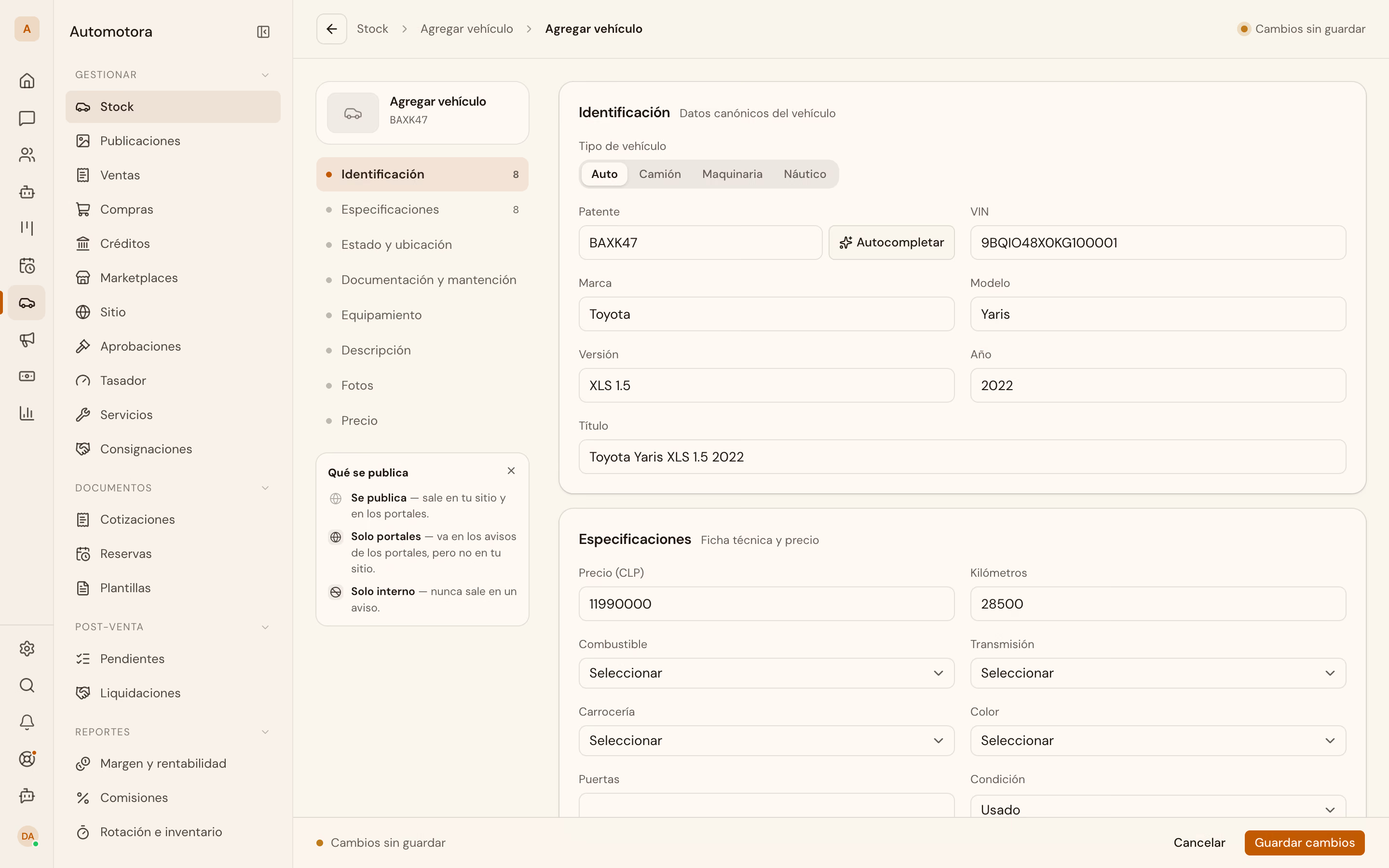
In the app: the same thing happens from Stock → Agregar vehículo. The form does not warn about a repeated plate while you type: the conflict shows up on save.
With the stock loaded and published, Publish your stock on your website takes it public, and List who's interested in a car answers who asked about each unit.