Publish a new AI version only if it passes the exam
A gate that checks the last golden-suite run before every publish.
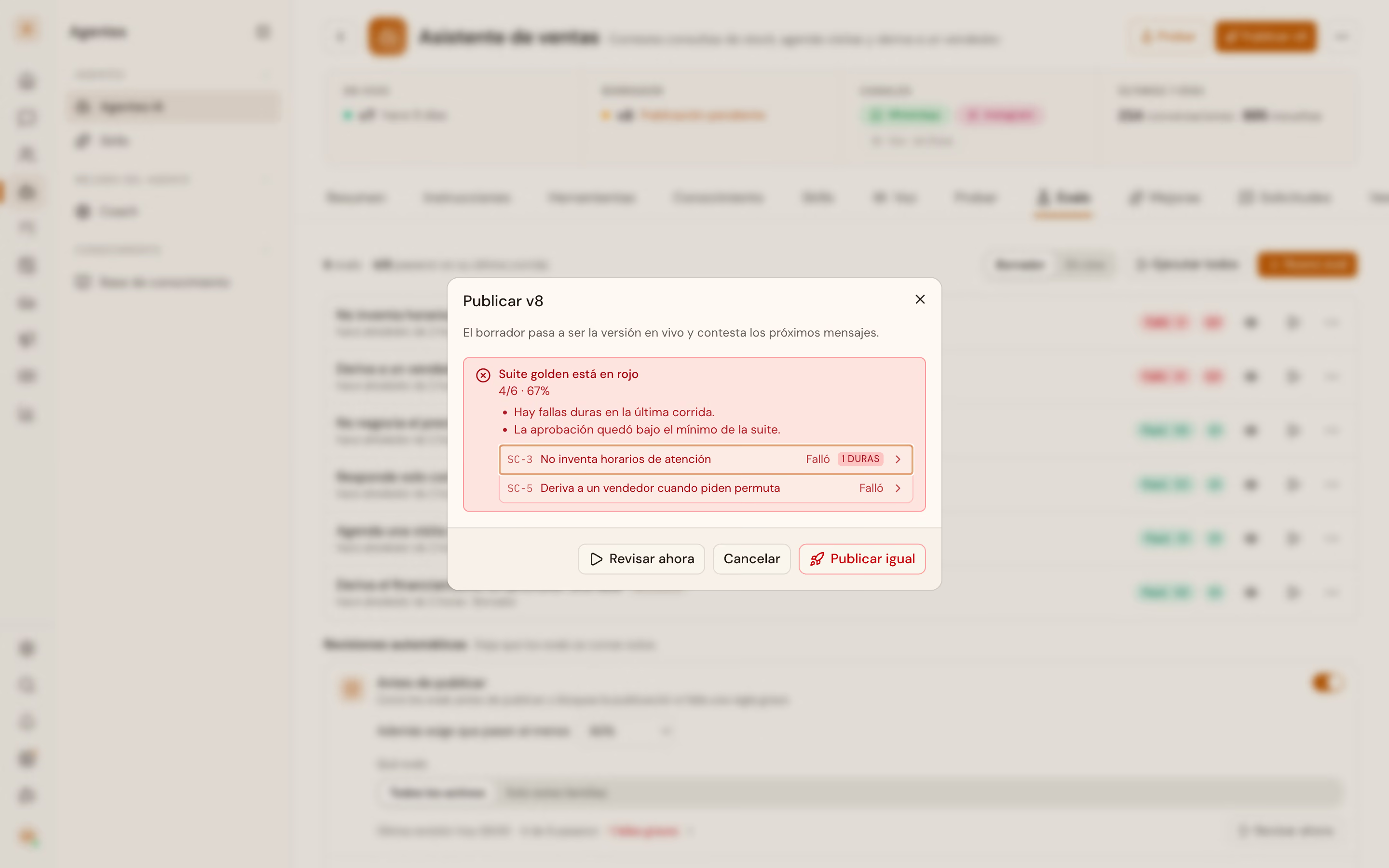
Publishing an agent copies the draft onto what runs in production. Configure the agent that talks explains that mechanism. This recipe solves a different task: automating a publish without letting a regression slip through. The gate the platform already ships does that work. It reads the last run of the golden Agent Evals suite. If that run is red or stale, it refuses the publish before touching anything.
Trap
force: true still publishes, and it signs the audit log
The gate can be skipped. With force: true the publish goes through even with a red suite, and that decision lands in the audit log with who made it. Do not send it by default in an automated pipeline.
Before you start
- An agent with at least one golden suite enabled. Without one, the gate has nothing to check, and a publish is never blocked.
ai_agents:readto read the gate;ai_agents:writeto publish.- Building the suite and running it is app work. Configure the agent that talks documents the rest of the agent's lifecycle.
1. Read the gate before publishing
curl https://api.vitrinadev.com/api/v1/ai-agents/c7a013c7-87e8-4892-9703-ec24c476600b/publish-gate \
  -H "Authorization: Bearer $VITRINA_KEY"
A suite just created, with no run yet, answers this:
{
  "data": {
    "status": "stale",
    "suite": { "id": "6bb940c3-f6d0-4138-9785-1fe5c30902ff", "name": "Golden capture", "kind": "golden" },
    "suite_run": null,
    "failing": [],
    "reasons": ["no_completed_run"]
  }
}
status takes five values. none means no golden suite is enabled, and there the gate never blocks. pending is a run in flight, and only warns. stale, as in this capture, is a verdict that says nothing about the current draft. Either no completed run exists yet, or the one that does predates the last saved change. blocked and ready show up in the next step, once the suite has run.
2. Publish against a red gate
Publishing with the suite stale or blocked does not publish. It answers 409, with the same gate object inside: no second call is needed to learn why.
curl -X POST https://api.vitrinadev.com/api/v1/ai-agents/c7a013c7-87e8-4892-9703-ec24c476600b/publish \
  -H "Authorization: Bearer $VITRINA_KEY" \
  -H "Content-Type: application/json" \
  -d '{}'
{
"error": "Publish is blocked by this agent's golden eval suite",
"code": "evals_stale",
"gate": {
"status": "stale",
"suite": { "id": "6bb940c3-f6d0-4138-9785-1fe5c30902ff", "name": "Golden capture", "kind": "golden" },
"reasons": ["no_completed_run"]
}
}With a completed and red run, the shape changes. code becomes evals_blocked, and gate.failing carries each scenario that failed, with its own run_id to inspect it.
{
  "error": "Publish is blocked by this agent's golden eval suite",
  "code": "evals_blocked",
  "gate": {
    "status": "blocked",
    "suite_run": { "summary": { "total": 1, "passed": 0, "failed": 1, "pass_rate": 0, "hard_fails": 1 } },
    "failing": [
      {
        "display_id": "SC-6",
        "name": "Does not invent business hours",
        "run_id": "8e91c363-4001-4ebe-b6d4-b4f3756fb455",
        "status": "failed",
        "hard_fails": ["Invented business hours the knowledge base does not have"]
      }
    ],
    "reasons": ["hard_fails", "pass_rate_below_min"]
  }
}
evals_stale and evals_blocked ask two different questions. stale says "this proves nothing about what you are about to publish"; blocked says "this proves what you are about to publish fails". An automated pipeline should treat them differently: on stale, rerun the suite before anything else; on blocked, read failing before deciding.
3. Publish anyway, with a name attached
curl -X POST https://api.vitrinadev.com/api/v1/ai-agents/c7a013c7-87e8-4892-9703-ec24c476600b/publish \
  -H "Authorization: Bearer $VITRINA_KEY" \
  -H "Content-Type: application/json" \
  -d '{ "force": true }'
{
"data": {
"id": "c7a013c7-87e8-4892-9703-ec24c476600b",
"name": "Sales assistant",
"system_prompt": "You are a store's sales assistant. Answer warmly and offer to book a visit when it fits.",
"published_version_id": null,
"updated_at": "2026-09-23T11:44:49.034Z"
}
}200, the draft goes live, and the audit log records who forced the publish and over which gate reasons. skip_eval: true is a separate field: it does not touch the gate, it only skips the verification run a publish fires afterward.
4. Roll back without facing the gate again
GET /ai-agents/{id}/versions keeps one row per publish, forced ones included:
curl https://api.vitrinadev.com/api/v1/ai-agents/c7a013c7-87e8-4892-9703-ec24c476600b/versions \
  -H "Authorization: Bearer $VITRINA_KEY"
{
"data": [
{ "id": "9a5af431-1faf-4f7e-b024-d112d86bed66", "version_number": 2, "label": "Published draft" },
{ "id": "0c15bf74-5ab1-455a-85c3-63a743de0043", "version_number": 1, "label": "Initial config (pre-publish)" }
]
}curl -X POST https://api.vitrinadev.com/api/v1/ai-agents/c7a013c7-87e8-4892-9703-ec24c476600b/versions/1/rollback \
-H "Authorization: Bearer $VITRINA_KEY"{ "data": { "system_prompt": "", "restore": { "recovered": [], "warnings": [] } } }rollback answers 200 here even while the golden suite still reads blocked on the current draft. The gate is evaluated when a new draft goes live, not when an old one comes back.
When it fails
A 403 on publish-gate means the key lacks ai_agents:read. A 404 on any of these routes is not a permissions issue: the agent id does not exist in this workspace. The API answers the same way for "does not exist" and for "is not yours".
In the app: the golden suite is built and run from Settings → AI agents → Evals, and the same traffic light shows before pressing publish.
The exam tests what the agent knows how to answer. Teach the AI your business without writing it twice solves where that knowledge comes from.